How to Add Content to Your Content Hub
Step-by-step guide to adding new content to your Content Hub.
A DittoSheets favorite
The backstory ...
When Ditto Sheets was still in its infancy, my husband had already written for me to have most of the functionality that you see in the Sheet Builder. I could make Sheets whenever I needed. It was great... almost.
Robin
My "problem" came when I needed to print out another copy of something I had, and needed to tweak a small detail. (I couldn't just reprint a saved PDF, that wouldn't suffice.)
So I asked David to make a way for me to save the content (the plain text) in a database. I wanted to save the plain text SO THAT I could call up that text and apply kid #2 settings, or apply a fun font this time.
Hubby is amazing. I could not be happy with DittoSheet in the long term UNLESS he has written this feature. I think you will agree.
Adding Content into the Hub

Go to Content Hub from the side menu.

Tap + Add New at the top.
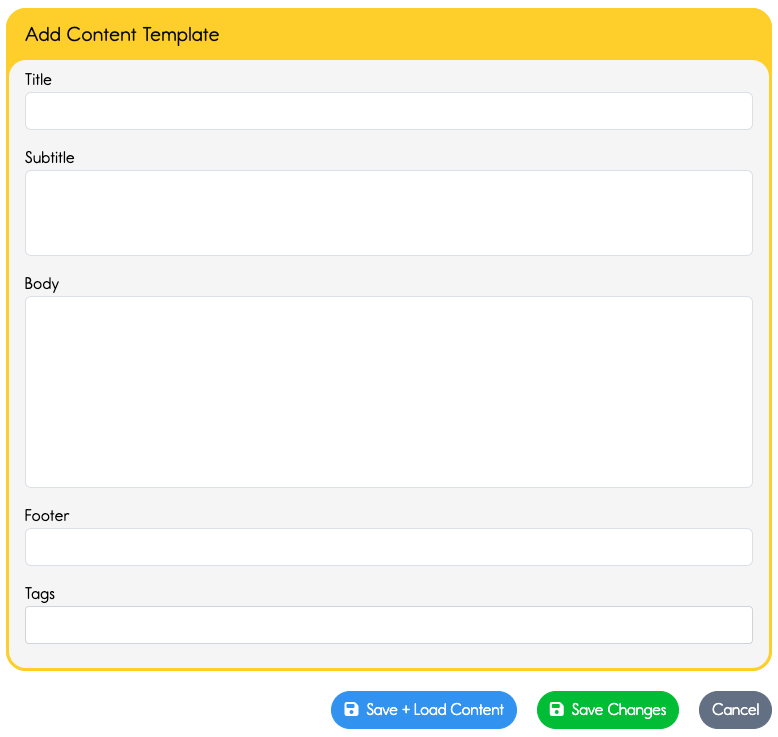
Fill in the fields....
Make sure you have a title. This will appear at the top of your DittoSheet.
Type or paste your text into the Body field. Add or remove any line breaks.
Add footer info if you'd like. The footer appears on all pages, so it may be useful to utilize this field just in case pages get lost.
ADD TAGS! Begin as you mean to go, right? Tags are super helpful. I won't belabor the point here. Head over to the lesson on tagging if you need convincing, or need tagging ideas.
Click Save.
You can tap the green Save Changes if you have more to do in the Content Hub.
Or, you can tap the blue Save + Load Content, to immediately bring it into the Sheet Builder and create a Sheet from this content.
Why use Content Hub?
The answer to this question is a bit similar to asking "Why do I need a bookshelf for my books?"
You need a bookshelf because your mess of book will drive you crazy. And at some point you'll not even bother to try to get the book at the bottom of the stack. You'll forget about the books that were kicked beneath the sofa.
Organization is a blessing.
When your books are orderly you can enjoy them much more easily, and you'll continue to.
When you save your ideas as Content in the Hub, AND Tag your content, then you have an easier time calling up ideas you've already created. No sense wasting time reinventing the wheel. Would you buy another copy of a book if you know it's in the house somewhere? Same idea.